Docs
Review new MCP servers and skills before they run
Developers install MCP servers and skills from the internet all the time. Decide whether new ones run right away, wait for you, or are refused.
What this is about
An MCP server is an add-on an AI tool can call to get things done: read a database, search the web, talk to GitHub. A skill is a written set of instructions the AI follows for a task. Both are installed from the internet, often from a stranger's repository, and both can do real harm if they're malicious. ZYBE lists every one on every laptop and lets you decide what happens to new ones.
Choose what happens to new things
- Click the gear icon, then Rules.
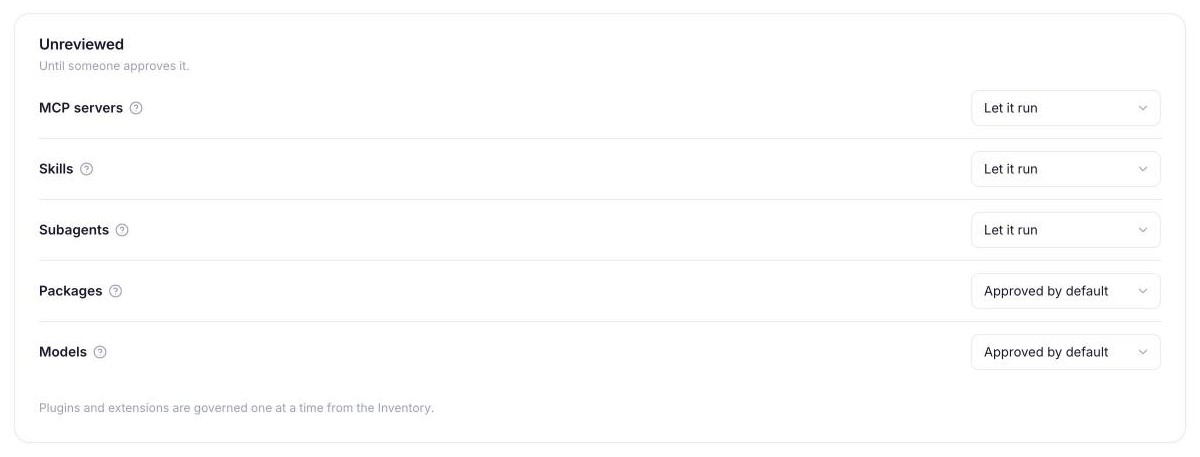
- Find the Unreviewed card. It has a row for MCP servers, Skills, Subagents, Packages and Models.
- For each row choose:
- Let it run. It works right away and shows up as New for you to review later.
- Hold for review. It doesn't work until you approve it. The developer gets a page where they can ask, with a reason, and the request lands on your Requests page.
- Refuse. It never runs.
For a cautious start, set MCP servers and Skills to Hold for review and leave Packages on Let it run, since developers install packages all day.
Review what's new
- Click Issues, then the Unreviewed chip.
- Open an item. You'll see where it is, who has it, what it can do (run commands, reach the network), and for skills, a judgement on whether its text contains hidden instructions.
- Click Actions. Approve lets it run everywhere. Block contains it: every laptop refuses it from the next policy refresh, by content, so renaming it doesn't help.
Handle a request
- Click Requests in the top bar.
- Under Waiting, each request shows who asked, on which laptop, and why.
- Click Allow, Allow 7 days, 30 days or Deny. If the workspace requires a note, you'll be asked for one.
Refuse a product by name
Refused products on the same card takes a product's name. A tool with a hook has every call refused. An app with no hook is denied its permission to run on the laptop and shows Not allowed. See Refuse an AI app.
What other customers have found
You don't set anything for this. Known malicious packages are refused at install on every laptop, from one list kept for all workspaces. And the first time a skill, subagent or plugin is seen anywhere, ZYBE judges it once and every workspace sees that verdict.